 Contact
 Subscribe
 Jul 27, 2009
Finally here we come!
Yup, sry for the delay, I’ve had a lot of work recently.
I have prepared three demos and a publishable (but far from perfect and not yet documented) class. The demos are FLA based… you can find the timeline code to assemble the demos at the bottom of the post. I’ll publish some documentation in the next days, so until then just look at the demos’ code to unserstand the basic of the class usage.
Download Lightning classes
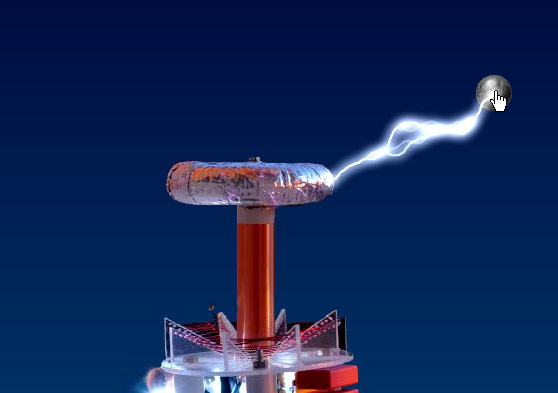
Demo N°1:
This demo shows the two different behaviours the class can mimic: Electric discharge/beam or lightning. Drag the ball near or far to the coil to see different behaviors.
Demo N°2:
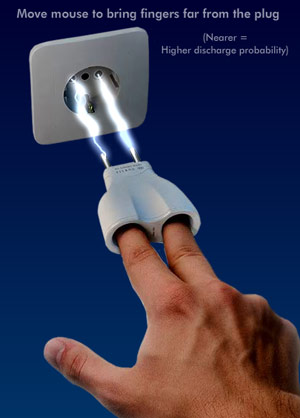
This demos show the maxLength and maxLengthVary properties in action.
Bring the fingers near to the plug to have continuos electricity. Bringing the hand far from the plug lowers the discharge probability. Reaching the max distance simply disables it.
Demo N°3:
This demo is a good reason for the publishing delay 
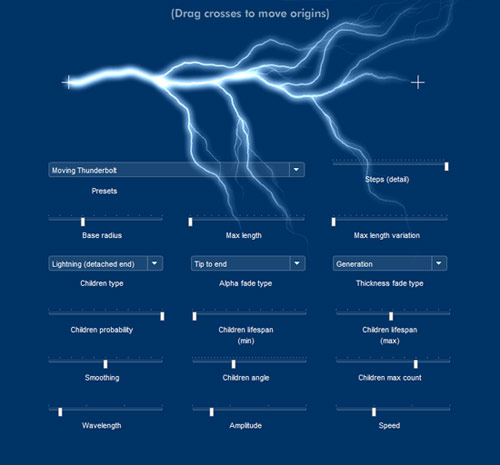
A nice sandbox to play with (some of) the properties.
The class is recursive to create children so many properties have also a decay twin property which rule how the property is passed to children.
As instance if you set a childrenMaxCount = 6 to the main Lightning instance it will have a maximum of 6 direct children. Its children will have a childrenMaxCount value which depends on the main instance childrenMaxCount and childrenMaxCountDecay.
So if you set childrenMaxCount = 6 and childrenMaxCountDecay = .5 the children of the main instance will have childrenMaxCount = 3.
If you set childrenMaxCount = 6 and childrenMaxCountDecay = 0 the children of the main instance will have childrenMaxCount = 6 (no decay).
This value can be very useful to optimize the speed of execution cause smaller branches don’t need many children or many steps of detail.
Ok, I’m too tired to write more. I’ll publish some documentation in the next days.
Feel free to ask everything question you can have in the comments, and as usual if you like this stuff scream it in the comments!
Demos’ code after the break. Waiting for your comments I will surf through the website of fatcow and see if they have any good hosting plans.
Demos code is just timeline code to instance and pilot the lightning class… and very untidy! Please don’t blame it 
Demo N°1:
import com.oaxoa.fx.Lightning;
import com.oaxoa.fx.LightningFadeType;

const cx:uint=360;
const cy:uint=320;

var color:uint=0xffffff;
var ll:Lightning=new Lightning(color, 2);
ll.blendMode=BlendMode.ADD;
ll.childrenDetachedEnd=true;
ll.childrenLifeSpanMin=.1;
ll.childrenLifeSpanMax=2;
ll.childrenMaxCount=4;
ll.childrenMaxCountDecay=.5;
ll.steps=150;
ll.alphaFadeType=LightningFadeType.TIP_TO_END;

ball.useHandCursor=ball.buttonMode=true;
dot1.mouseEnabled=dot2.mouseEnabled=false;
dot1.alpha=.75;

var glow:GlowFilter=new GlowFilter();
glow.color=color;
glow.strength=3.5;
glow.quality=3;
glow.blurX=glow.blurY=10;
ll.filters=dot1.filters=dot2.filters=[glow];
addChild(ll);

ll.childrenProbability=.3;

var p:Point=new Point();
randomizePoint();
function randomizePoint():void {
	var angle:Number=-Math.random()*Math.PI;
	var dist:Number=160+Math.random()*180;
	p.x=cx+Math.cos(angle)*dist;
	p.y=cy+Math.sin(angle)*dist;
}

addEventListener(Event.ENTER_FRAME, onframe);
function onframe(event:Event):void {

	var rnd:Number=Math.random();
	if(rnd<.05) randomizePoint();
	var dx:Number=cx-ball.x;
	var dy:Number=cy-ball.y;
	var d:Number=Math.sqrt(dx*dx+dy*dy);
	if(d<310) {
		dot2.visible=true;
		if(ll.childrenDetachedEnd) {
			ll.childrenDetachedEnd=false;
			ll.alphaFadeType=LightningFadeType.GENERATION;
			ll.killAllChildren();
		}

		ll.endX=dot2.x=ball.x;
		ll.endY=dot2.y=ball.y;
	} else {
		dot2.visible=false;
		if(!ll.childrenDetachedEnd) {
			ll.childrenDetachedEnd=true;
			ll.alphaFadeType=LightningFadeType.TIP_TO_END;
			ll.killAllChildren();
		}
		ll.endX=p.x;
		ll.endY=p.y;
	}
	var ddx:Number=cx-ll.endX;
	var ddy:Number=cy-ll.endY;
	var aangle:Number=Math.atan2(ddy, ddx);
	ll.startX=cx-Math.cos(aangle)*80;
	dot1.scaleX=Math.sin(aangle);
	ll.startY=cy;
	dot1.x=ll.startX;
	dot1.y=ll.startY;
	ll.update();
}

ball.addEventListener(MouseEvent.MOUSE_DOWN, onmdown);
function onmdown(event:MouseEvent):void {
	ball.startDrag();
}
ball.addEventListener(MouseEvent.MOUSE_UP, onmup);
function onmup(event:MouseEvent):void {
	ball.stopDrag();
}
Demo N°2:
import com.oaxoa.fx.Lightning;
import com.oaxoa.fx.LightningFadeType;

setChildIndex(fingers, 2);

var iy:Number=fingers.y;
addEventListener(MouseEvent.MOUSE_MOVE, onmove);

fingers.x=fingers.y/2.5-10;

function updatePositions():void {
	ll.endX=fingers.x+fingers.dot1.x;
	ll.endY=fingers.y+fingers.dot1.y;
	ll2.endX=fingers.x+fingers.dot2.x;
	ll2.endY=fingers.y+fingers.dot2.y;
}

function onmove(event:MouseEvent):void {
	fingers.y=mouseY-150;
	if(fingers.y320) fingers.y=320;
	fingers.x=fingers.y/2.5-10;
	updatePositions();
	event.updateAfterEvent();
}
addEventListener(Event.ENTER_FRAME, onframe);
function onframe(event:Event):void {
	ll.update();
	ll2.update();
}

var color:uint=0xddeeff;
var ll:Lightning=new Lightning(color, 2);
var ll2:Lightning=new Lightning(color, 2);
ll.blendMode=ll2.blendMode=BlendMode.ADD;
ll.childrenProbability=ll2.childrenProbability=.5;
ll.childrenLifeSpanMin=ll2.childrenLifeSpanMin=.1;
ll.childrenLifeSpanMax=ll2.childrenLifeSpanMax=2;
ll.maxLength=ll2.maxLength=50;
ll.maxLengthVary=ll2.maxLengthVary=200;

ll.startX=dot3.x;
ll.startY=dot3.y;
ll2.startX=dot4.x;
ll2.startY=dot4.y;

var glow:GlowFilter=new GlowFilter();
glow.color=color;
glow.strength=3.5;
glow.quality=3;
glow.blurX=glow.blurY=10;
ll.filters=ll2.filters=[glow];
addChild(ll);
addChild(ll2);

updatePositions();
Demo N°3:
(The ugliest bunch of random code lines ever written )
import com.oaxoa.fx.Lightning;
import com.oaxoa.fx.LightningFadeType;
import com.oaxoa.components.ToolTip;
import fl.controls.Button;
import fl.data.DataProvider;

import fl.events.SliderEvent;
var color:uint=0xffffff;
var ll:Lightning=new Lightning(color, 2);
ll.blendMode=BlendMode.ADD;

var glow:GlowFilter=new GlowFilter();
glow.color=color;
glow.strength=4;
glow.quality=3;
glow.blurX=glow.blurY=10;
ll.filters=[glow];
addChild(ll);
ll.startX=cross1.x;
ll.startY=cross1.y;

ll.endX=cross2.x;
ll.endY=cross2.y;

setChildIndex(ll,0);

ll.childrenMaxGenerations=3;
ll.childrenMaxCountDecay=.5;

addEventListener(Event.ENTER_FRAME, onframe);
function onframe(event:Event):void {
	ll.startX=cross1.x;
	ll.startY=cross1.y;

	ll.endX=cross2.x;
	ll.endY=cross2.y;
	ll.update();
	updateCircles();
}

import com.oaxoa.components.FrameRater;
var fr:FrameRater=new FrameRater(0xffffff, true);
addChild(fr);

var ttip:ToolTip=new ToolTip();
addChild(ttip);

var tfmt:TextFormat=new TextFormat("_sans", 11, 0xffffff);

cb0.addItem({label:"Choose a preset", value:0});
cb0.addItem({label:"Fast discharge", value:1});
cb0.addItem({label:"Fast discharge (Max length + max length variation)", value:2});
cb0.addItem({label:"Fast discharge (slow-motion)", value:3});
cb0.addItem({label:"Moving Thunderbolt", value:4});
cb0.addItem({label:"Moving Thunderbolt (Max length + max length variation)", value:5});
cb0.selectedIndex=0;
cb0.addEventListener(Event.CHANGE, oncb);
cb0.textField.setStyle("textFormat", tfmt);
cb0.dropdown.setRendererStyle("textFormat", tfmt);

cb1.addItem({label:"Discharge", value:false});
cb1.addItem({label:"Lightning (detached end)", value:true});
cb1.selectedIndex=1;
cb1.addEventListener(Event.CHANGE, oncb);
cb1.textField.setStyle("textFormat", tfmt);
cb1.dropdown.setRendererStyle("textFormat", tfmt);

cb2.addItem({label:"None", value:LightningFadeType.NONE});
cb2.addItem({label:"Generation", value:LightningFadeType.GENERATION});
cb2.addItem({label:"Tip to end", value:LightningFadeType.TIP_TO_END});
cb2.selectedIndex=2;
cb2.addEventListener(Event.CHANGE, oncb);
cb2.textField.setStyle("textFormat", tfmt);
cb2.dropdown.setRendererStyle("textFormat", tfmt);

cb3.addItem({label:"None", value:LightningFadeType.NONE});
cb3.addItem({label:"Generation", value:LightningFadeType.GENERATION});
cb3.addItem({label:"Tip to end", value:LightningFadeType.TIP_TO_END});
cb3.selectedIndex=2;
cb3.addEventListener(Event.CHANGE, oncb);
cb3.textField.setStyle("textFormat", tfmt);
cb3.dropdown.setRendererStyle("textFormat", tfmt);

function oncb(event:Event):void {
	var t:ComboBox=event.currentTarget as ComboBox;
	switch(t) {
		case cb0:
			setPreset(t.selectedItem.value);
			break;
		case cb1:
			ll.childrenDetachedEnd=t.selectedItem.value;
			ll.killAllChildren();
			break;
		case cb2:
			ll.alphaFadeType=t.selectedItem.value;
			ll.killAllChildren();
			break;
		case cb3:
			ll.thicknessFadeType=t.selectedItem.value;
			ll.killAllChildren();
			break;
	}
}


slider.addEventListener(SliderEvent.CHANGE, onslider);
slider2.addEventListener(SliderEvent.CHANGE, onslider);
slider3.addEventListener(SliderEvent.CHANGE, onslider);
slider4.addEventListener(SliderEvent.CHANGE, onslider);
slider5.addEventListener(SliderEvent.CHANGE, onslider);
slider6.addEventListener(SliderEvent.CHANGE, onslider);
slider7.addEventListener(SliderEvent.CHANGE, onslider);
slider8.addEventListener(SliderEvent.CHANGE, onslider);
slider9.addEventListener(SliderEvent.CHANGE, onslider);
slider10.addEventListener(SliderEvent.CHANGE, onslider);
slider11.addEventListener(SliderEvent.CHANGE, onslider);
slider12.addEventListener(SliderEvent.CHANGE, onslider);
slider13.addEventListener(SliderEvent.CHANGE, onslider);
function onslider(event:SliderEvent):void {
	var t:Slider=event.currentTarget as Slider;
	ttip.show(t.value.toString());
	ttip.y=t.y-30;
	switch(t) {
		case slider:
			ll.smoothPercentage=t.value;
			break;
		case slider2:
			ll.childrenAngleVariation=t.value;
			break;
		case slider3:
			ll.childrenMaxCount=t.value;
			break;
		case slider4:
			ll.wavelength=t.value;
			break;
		case slider5:
			ll.amplitude=t.value;
			break;
		case slider6:
			ll.speed=t.value;
			break;
		case slider7:
			ll.thickness=t.value;
			ll.killAllChildren();
			break;
		case slider8:
			ll.maxLength=t.value;
			break;
		case slider9:
			ll.maxLengthVary=t.value;
			break;
		case slider10:
			ll.childrenProbability=t.value;
			ll.killAllChildren();
			break;
		case slider11:
			ll.childrenLifeSpanMin=t.value;
			ll.killAllChildren();
			if(t.value>slider12.value) slider12.value=t.value;
			break;
		case slider12:
			ll.childrenLifeSpanMax=t.value;
			ll.killAllChildren();
			slider11.visible=t.value!=0;
			break;
		case slider13:
			ll.steps=t.value;
			ll.killAllChildren();
			break;
	}
	ll.render();
}

function setPreset(n:uint):void {
	switch(n) {
		// fast discharge
		case 1:
			ll.childrenLifeSpanMin=1;
			ll.childrenLifeSpanMax=3;
			ll.childrenProbability=1;
			ll.childrenMaxGenerations=3;
			ll.childrenMaxCount=4;
			ll.childrenAngleVariation=110;
			ll.thickness=2;
			ll.steps=100;

			ll.smoothPercentage=50;
			ll.wavelength=.3;
			ll.amplitude=.5;
			ll.speed=.7;
			ll.maxLength=0;
			ll.maxLengthVary=0;

			ll.childrenDetachedEnd=false;
			cb1.selectedIndex=0;
			ll.alphaFadeType=LightningFadeType.GENERATION;
			cb2.selectedIndex=1;
			ll.thicknessFadeType=LightningFadeType.NONE;
			cb3.selectedIndex=0;

			break;
		// fast discharge (with max length+variation)
		case 2:
			ll.childrenLifeSpanMin=1;
			ll.childrenLifeSpanMax=3;
			ll.childrenProbability=1;
			ll.childrenMaxGenerations=3;
			ll.childrenMaxCount=4;
			ll.childrenAngleVariation=110;
			ll.thickness=2;
			ll.steps=100;

			ll.smoothPercentage=50;
			ll.wavelength=.3;
			ll.amplitude=.5;
			ll.speed=.7;
			ll.maxLength=440;
			ll.maxLengthVary=75;

			ll.childrenDetachedEnd=false;
			cb1.selectedIndex=0;
			ll.alphaFadeType=LightningFadeType.GENERATION;
			cb2.selectedIndex=1;
			ll.thicknessFadeType=LightningFadeType.NONE;
			cb3.selectedIndex=0;

			break;
		// fast discharge slowmo
		case 3:
			ll.childrenLifeSpanMin=1;
			ll.childrenLifeSpanMax=3;
			ll.childrenProbability=1;
			ll.childrenMaxGenerations=3;
			ll.childrenMaxCount=4;
			ll.childrenAngleVariation=110;
			ll.thickness=2;
			ll.steps=100;

			ll.smoothPercentage=50;
			ll.wavelength=.3;
			ll.amplitude=.5;
			ll.speed=.1;
			ll.maxLength=0;
			ll.maxLengthVary=0;

			ll.childrenDetachedEnd=false;
			cb1.selectedIndex=0;
			ll.alphaFadeType=LightningFadeType.GENERATION;
			cb2.selectedIndex=1;
			ll.thicknessFadeType=LightningFadeType.NONE;
			cb3.selectedIndex=0;

			break;
		// moving thumnder
		case 4:
			ll.childrenLifeSpanMin=.1;
			ll.childrenLifeSpanMax=2;
			ll.childrenProbability=1;
			ll.childrenMaxGenerations=3;
			ll.childrenMaxCount=4;
			ll.childrenAngleVariation=130;
			ll.thickness=3;
			ll.steps=100;

			ll.smoothPercentage=50;
			ll.wavelength=.3;
			ll.amplitude=.5;
			ll.speed=1;
			ll.maxLength=0;
			ll.maxLengthVary=0;

			ll.childrenDetachedEnd=true;
			cb1.selectedIndex=1;
			ll.alphaFadeType=LightningFadeType.TIP_TO_END;
			cb2.selectedIndex=2;
			ll.thicknessFadeType=LightningFadeType.GENERATION;
			cb3.selectedIndex=1;

			break;
		case 5:
			ll.childrenLifeSpanMin=.1;
			ll.childrenLifeSpanMax=2;
			ll.childrenProbability=1;
			ll.childrenMaxGenerations=3;
			ll.childrenMaxCount=4;
			ll.childrenAngleVariation=130;
			ll.thickness=3;
			ll.steps=100;

			ll.smoothPercentage=50;
			ll.wavelength=.3;
			ll.amplitude=.5;
			ll.speed=1;
			ll.maxLength=440;
			ll.maxLengthVary=75;

			ll.childrenDetachedEnd=true;
			cb1.selectedIndex=1;
			ll.alphaFadeType=LightningFadeType.TIP_TO_END;
			cb2.selectedIndex=2;
			ll.thicknessFadeType=LightningFadeType.GENERATION;
			cb3.selectedIndex=1;

			break;
	}
	ll.killAllChildren();
	updateSliders();
}
function updateSliders():void {
	slider.value=ll.smoothPercentage;
	slider2.value=ll.childrenAngleVariation;
	slider3.value=ll.childrenMaxCount;
	slider4.value=ll.wavelength;
	slider5.value=ll.amplitude;
	slider6.value=ll.speed;
	slider7.value=ll.thickness;
	slider8.value=ll.maxLength;
	slider9.value=ll.maxLengthVary;
	slider10.value=ll.childrenProbability;
	slider11.value=ll.childrenLifeSpanMin;
	slider12.value=ll.childrenLifeSpanMax;
	slider13.value=ll.steps;
}
///////////////////

var tf:TextFormat=new TextFormat();
tf.color=0xffffff;

cross1.addEventListener(MouseEvent.MOUSE_UP, onup);
cross1.addEventListener(MouseEvent.MOUSE_DOWN, ondown);
cross2.addEventListener(MouseEvent.MOUSE_UP, onup);
cross2.addEventListener(MouseEvent.MOUSE_DOWN, ondown);
cross1.buttonMode=cross2.buttonMode=cross1.useHandCursor=cross2.useHandCursor=true;

function ondown(event:MouseEvent):void {
	event.currentTarget.alpha=.2;
	event.currentTarget.startDrag();
}
function onup(event:MouseEvent):void {
	event.currentTarget.alpha=1;
	event.currentTarget.stopDrag();
}
var circles:Shape=new Shape();
addChildAt(circles, 0);

function updateCircles():void {
	circles.graphics.clear();
	if(ll.maxLength>0) {
		circles.graphics.lineStyle(6, 0xffffff, .3);
		circles.graphics.drawCircle(cross1.x, cross1.y, ll.maxLength);
		circles.graphics.lineStyle(2, 0xffffff, .4);
		circles.graphics.drawCircle(cross1.x, cross1.y, ll.maxLength+ll.maxLengthVary);
		var steps:uint=5;
		for(var i:uint=1; i
 87 Comments


