Browsing the archives for the equalizer category.

Actionscript 3 - Fun with isometrics (part2 (with source))

BitmapData, Math, actionscript 3, classes, equalizer, fun

Hi there,

back again with some funny isoStuff.
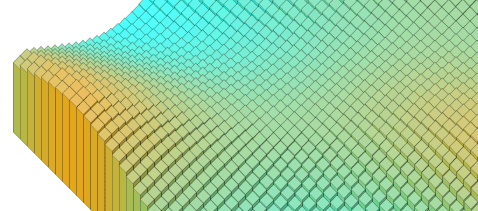
Here’s an optimized and enhanced version of the previous post, and with source code explained.
It now has dynamic colors and you can choose colors and size (for hi and low values).

See it moving

Ok now some explanation:
The main trick behind this (for who didn’t noticed) is that the code simply redraw at every frame just the first line of blocks. Then simply draw() that first line into a BitmapData that scrolls of a block size… and the trick lives!

Ok, speaking about optimization… two main things:
1. Draw it without a line (just fills) and it goes 2x faster
2. Even that first line (60 pieces only) was not actually so fast…

About this second point the code involved with sine-wave and dynamic colors calculation contains some math equation, but nothing can really send your CPU @100%. The main CPU draining comes from the visual/rendering part.
One solution I implemented in this experiment (and it’s a trick can be used very often) is simply draw into a bitmap even that first line without adding to childList the vector part. With this little trick fps went from 15 to 31 =).

The second thing is simply that you dont really need to redraw every block @ every frame to achive a cool effect. You could just change its y without changing size for a poorer effect but surely faster. However remember that changing y can lead to higher fps but will not be enough if you still move a lot of vector shapes on screen. Draw everything to a bitmap is rule #1 for speed issues.
You could even use slice-9 grids to change the height of a block or use an animation build with 100 frames and simple gotoAndPlay(value) so you don’t have to draw everything programmatically.

Of course you can use this base for everything you need. Display height maps (maybe I’ll be posting a example of this), equalizers etc.

Now comes the code. First you will need the two classes involved.

The classes are not packaged and very simple. Simply extract them in the main dir or package them in some “common classes/com/oaxoa/blabla” folder
This was written very fast so no packaging, don’t expect setters/getters for every parameter or perfectly protected vars etc.

Ok you got the classes, now the main code. Just the first 30 lines are really needed. The rest is just to add and layout the sliders and colorpickers components.

import IsoField;
import com.oaxoa.components.FrameRater;
import fl.controls.ColorPicker;
import fl.controls.Slider;
 
var minsize:Number=10;
var maxsize:Number=10;
var spacing:Number=10;
var angle:Number=45;
var angleRadians:Number=angle/180*Math.PI;
var isofield:IsoField=new IsoField(1, 60, minsize, maxsize, spacing, angle, 0x00ffff, 0xff9900);
 
isofield.x=50;
isofield.y=50;
 
var bd:BitmapData=new BitmapData(800, 600, false, 0xffffff);
var bmp:Bitmap=new Bitmap(bd);
 
addChild(bmp);
addChild(isofield);
 
addEventListener(Event.ENTER_FRAME, onframe);
 
function onframe(event:Event):void {
	isofield.cycle();
	var matrix:Matrix=new Matrix();
	matrix.translate(50, 50);
	bd.draw(isofield, matrix);
	bd.scroll(spacing*Math.sin(angleRadians), -spacing*Math.cos(angleRadians));
}
 
// Main code end here. Stuff below is just to add sliders, labels and color pickers.
 
// add the frameRater
var fr:FrameRater=new FrameRater();
addChild(fr);
 
// add colorpickers
var cp1:ColorPicker=new ColorPicker();
cp1.x=20;
cp1.y=470;
cp1.selectedColor=0x00ffff;
addChild(cp1);
cp1.addEventListener(Event.CHANGE, oncp1);
 
var cp2:ColorPicker=new ColorPicker();
cp2.x=60;
cp2.y=470;
cp2.selectedColor=0xff9900;
addChild(cp2);
cp2.addEventListener(Event.CHANGE, oncp2);
 
function oncp1(event:Event):void {
	isofield.mincolor=cp1.selectedColor;
}
 
function oncp2(event:Event):void {
	isofield.maxcolor=cp2.selectedColor;
}
 
// add sliders
 
var slider1:Slider=new Slider();
slider1.minimum=4;
slider1.maximum=10;
slider1.value=10;
slider1.snapInterval=1;
slider1.liveDragging=true;
slider1.x=20;
slider1.y=510;
slider1.addEventListener(Event.CHANGE, onslider1);
addChild(slider1);
 
var slider2:Slider=new Slider();
slider2.minimum=4;
slider2.value=10;
slider2.maximum=10;
slider2.snapInterval=1;
slider2.liveDragging=true;
slider2.x=20;
slider2.y=540;
slider2.addEventListener(Event.CHANGE, onslider2);
addChild(slider2);
 
var slider3:Slider=new Slider();
slider3.minimum=-10;
slider3.value=6;
slider3.maximum=10;
slider3.snapInterval=1;
slider3.liveDragging=true;
slider3.x=20;
slider3.y=570;
slider3.addEventListener(Event.CHANGE, onslider3);
addChild(slider3);
 
var labelStr1:String="<b>Minimum size:</b> ";
var labelStr2:String="<b>Maximum size:</b> ";
var labelStr3:String="<b>Wave speed:</b> ";
 
function onslider1(event:Event):void {
	sliderLabel1.htmlText=labelStr1+String(slider1.value);
	isofield.minsize=slider1.value;
}
 
function onslider2(event:Event):void {
	sliderLabel2.htmlText=labelStr2+String(slider2.value);
	isofield.maxsize=slider2.value;
}
 
function onslider3(event:Event):void {
	sliderLabel3.htmlText=labelStr3+String(slider3.value);
	isofield.xfSpeed=slider3.value/1000;
}
 
var tf:TextFormat=new TextFormat();
tf.font="_sans";
 
var sliderLabel1:TextField=new TextField();
sliderLabel1.x=slider1.x+slider1.width+20;
sliderLabel1.y=slider1.y;
sliderLabel1.width=200;
sliderLabel1.selectable=false;
sliderLabel1.defaultTextFormat=tf;
sliderLabel1.htmlText=labelStr1+String(slider1.value);
addChild(sliderLabel1);
 
var sliderLabel2:TextField=new TextField();
sliderLabel2.x=slider2.x+slider2.width+20;
sliderLabel2.y=slider2.y;
sliderLabel2.width=200;
sliderLabel2.selectable=false;
sliderLabel2.defaultTextFormat=tf;
sliderLabel2.htmlText=labelStr2+String(slider2.value);
addChild(sliderLabel2);
 
var sliderLabel3:TextField=new TextField();
sliderLabel3.x=slider3.x+slider3.width+20;
sliderLabel3.y=slider3.y;
sliderLabel3.width=200;
sliderLabel3.selectable=false;
sliderLabel3.defaultTextFormat=tf;
sliderLabel3.htmlText=labelStr3+String(slider3.value);
addChild(sliderLabel3);

As usual I do like comments, so if you enjoy this (or not and want your five minutes back) -gogogo- leave one (and subscribe to my feed!) :D

4 Comments

Fountain equalizer now with source code

Particles, actionscript 3, classes, equalizer

I just edited the Fountain equalizer post adding the source code.
You’ll just need to download the two particles classes and copy the main code.

I received really a lot of requests about the code in the comments and by mail, and I am very pleased about this… means you liked it.

Expect more equalizing fun.

1 Comment

Actionscript particles - Fountain equalizer

Particles, actionscript 3, equalizer

Here’s a new experiment.
It uses the computeSpectrum method together with a simple particles class i wrote.

I think the effect is graphically very satisfing and personally cannot stop to look at it.
The song is “Aria regina della notte” from Mozart’s “Flauto Magico”.

Tomorrow I’ll post code and sources of this.

Hope you’ll be hypnothized from this as I am.
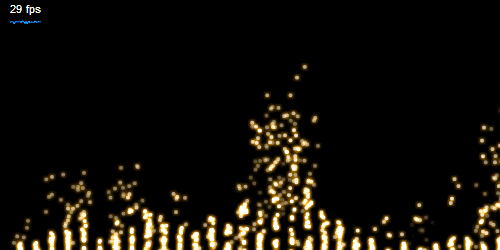
The picture is not well explaining, you must see this in action.

EDIT:

Ok, sorry for the late but here we are with the source code:

Download the SimpleParticleGenerator and SimpleParticle class zipped togheter, then just use this code to build the equalizer.
I release the code just now because I wanted to wrap the main code in a class too, and maybe add some methods to scale it like a component, but I realized it’s totally unuseful for few lines of code, and I don’t wanna loose the fun part in the experiment.

I promise that from now I will be faster to release the source code :)

// Author: Pierluigi Pesenti
// Web: http://blog.oaxoa.com
 
import flash.media.Sound;
import flash.net.URLRequest;
import flash.media.SoundMixer;
import flash.utils.ByteArray;
import flash.events.*;
import flash.display.Sprite;
import flash.filters.GlowFilter;
import com.oaxoa.fx.SimpleParticleGenerator;
import com.oaxoa.components.FrameRater;
 
var req:URLRequest=new URLRequest("mozart.mp3");
var sound:Sound=new Sound(req);
var ba:ByteArray=new ByteArray();
var samples:uint=32;
var offset:uint=256/samples;
 
// create a sprite and add 1*samples istances of the SimpleParticleGenerator class
var _holder:Sprite=new Sprite();
for(var i:uint=0; i<samples; i++) {
	var pg:SimpleParticleGenerator=new SimpleParticleGenerator();
	pg.y=252;
	pg.x=15+i*offset*2;
	pg.angleDeg=-90;
	_holder.addChild(pg);
}
 
// add the holder sprite and start music
addChild(_holder);
sound.play();
 
// listener for frame based animation
addEventListener(Event.ENTER_FRAME, onframe);
 
// some fancy glow filter
// the glow filter is added to the holder sprite
// and not to the single particle for two reasons
// a lot of speed gain, and visually better blend result
var glow:GlowFilter=new GlowFilter();
glow.color=0xFFAA00;
_holder.filters=[glow];
 
// at every frame
function onframe(event:Event):void {
	// compoute sound specturm
	SoundMixer.computeSpectrum(ba, true);
	var count:uint=0;
	//for every generator
	// with a 0-256 range only the left channel is sampled
	// you can easily goto from 256 to 512 for the right or sample both and average value
	for (var i:uint=0; i<256; i+=offset) {
		var t:Number=ba.readFloat();
		var n:Number=t*20;
		var g=_holder.getChildAt(count);
		// set the particles speed at a value of n
		// n = the sound peak * 20 to raise the effect
		g.speed=n;
		count++;
	}
}
 
//add frame rate meter
var fr:FrameRater=new FrameRater(0xffFFFF, false, true, 0x0099ff);
addChild(fr);

Expect more equalizing fun.

21 Comments