Actionscript 3 - Better perlinNoise (perlinNoise complexification)

BitmapData, actionscript 3, advanced image editing, perlinNoise

Ok, here we are… once again speaking about perlinNoise.

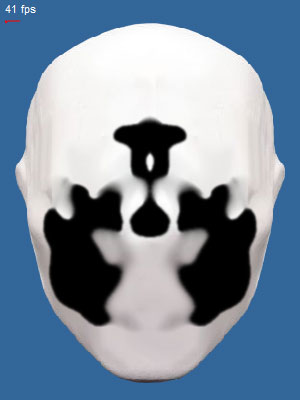
PerlinNoise is a super-cool function… nothing to object, it gives you the ability to render a smooth random varying surface on a bitmapdata.

You can use it for random behaviours, for mountains generation, for lots lots of stuff resembling the inner and deep variations hidden in nature… but lets say it: it’s kinda boring to look at.

Tired to have always the same old plain smooth boring perlinNoise? Try this simple variation.


Test interactive demo #1

The main concept is EXTREMELY simple and is a trick I inherited from photoshop “Render clouds / Render difference clouds” filters.

The logic is this:

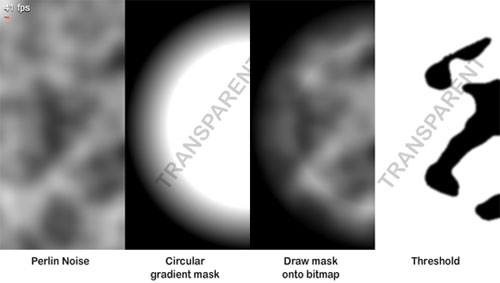
  1. Apply a simple perlinNoise method to a bitmapData
  2. For i=0 to i=N…
  3. Apply a simple perlinNoise method to a second bitmapData with a different seed at every iteration
  4. Composite the second bitmapData onto the first with the draw() method and a BlendMode.DIFFERENCE blend mode.

Look at the simple code:

Continue Reading »

2 Comments

Actionscript 3 Basic Tutorial - Easiest way to do easy stuff (Starfield class)

BitmapData, Particles, actionscript 3, algorithms, classes, fun, perlinNoise

I don’t usually post about two lines of code snippets, or about workarounds to that damn bug or about basic tutorials for beginners. I honestly haven’t enough time and will to post on a daily basis. Usually I use this blog to mantain me focused on a single project I find interesting and take it to the end (not a really working however :-P).

Logic comes first, code is the last step

So what about the title? What’s the the perfect beginner but somehow satisfying tutorial?
Answer snow/rain/starfield and you got it, and here we have a basic starfield class tutorial.

However the main reason I am posting this is not about the 30-40 code lines involved in rendering a random starfield but make you stop a moment and think about a possible easier way to do what you are doing.
I’ll try to be clearer: this morning I was working on a flash animation and just wanted to place a background starfield on my bucholic landscape view. So I quickly created the class but was missing something… off course a starfield is not cool if stars don’t twinkle (winkle, scintillate
shine… vary in light intensity etc.). So I started to recall the milions of experiments like this I did years ago in Actionscript 1 and ok… the first answer was something like:

  • Generate every star as a sprite/movieclip (possibily in a main container)
  • list the instance in some array, dictionary (whatever you prefer)
  • to make ‘em twinkle, at every frame, do a for loop on every instance and vary its alpha with some some increment/decrement/sine calculation (o simply randomize it if you are lazy)

or you can have a Star class togheter with the Starfield class and let the Star class think about everything, so it creates its EnterFrame event to start twinkling when added (but it’s always a bad idea to have hundres of EnterFrame events, when you can have only one in the main class.

But…

Flash teach me that there are always many options to get to the same results (that is what I really like most about flash developing), AND… that bitmap filters and blend modes are a gift to hardcore developers with tremendous possibilities.

So.. do we really want a subtle background effect to keep 50% of the CPU? I don’t.

Continue Reading »

6 Comments

Actionscript 3 - PixelMorphing Class (now with source code)

BitmapData, Particles, actionscript 3, advanced image editing, algorithms, classes, fun, morphing

Ok, lot of time passed since I posted my PixelMorphing class experiment.
Seemed to me that post passed quite unobserved but then I received a lot of feedback and e-mail asking to share the source code.

Well, the first time I wanted to speed up posting and do further experimentation/optimization so I din’t prepare the source but since the main believe of this blog is that if someone ask for code I release it, here we are. Optimization still not done… I am a lazy one, so if someone want to help improve it is really welcome.

Now the steps to play with it:

  1. Download the PixelMorphing class
  2. Use it with this code:
import com.oaxoa.fx.PixelMorphing;
var pm:PixelMorphing=new PixelMorphing(pic1, pic2, 200);
addChild(pm);
 
pm.start();
//pm.reset();

or certainly you can place some buttons or some combo and wait for some event for it to start or reset. The main code of the previous post is this:

Continue Reading »

6 Comments

Actionscript 3 (as3) - Real-time voxel landscape

3D, BitmapData, Math, actionscript 3, fun, perlinNoise

What can be the natural evolution of an isometric engine? Of course a voxel engine…

It was really a lot of time I had this in mind and already did some experiment, but never finalized them.
What I’ll show you now is some first implementation. Source code is already optimized but I need to finish class public methods so I’ll not post source for now.

Let me say that these screenshot really suck, but you got to see them moving (they runs very fast).

This first sample is a bitmap based map. The class wants two bitmap, one for the height map and one for the color. Of course you can use the same twice (but obviously it looks good only with grayscale images). With my brand new Intel Quad core QX9550 I easilly reach the fps limitator of 51 (ok, ok… on the screenshot is written 29 but believe me! :-D ). I am new to multi core cpu and I am really surprised to see that now the browser vs IDE situation totally changed. Now I can do 51 fps in the browser (Opera 9.23) and 30 in the IDE… mmm strange behaviour, maybe I just need some sleep.

The file is very big cause of the low compressed 2000×2000 jpeg files. No preloader (don’t even try to ask for it) so be patient please (631 Kb) ;-)


Actionscript voxel landscape (Image map)

(move mouse to fly around.Map is bitmap based so has boundaries)

This second one is to make you write some comment like: “hey man how can you be so stupid… trying to code a fast voxel engine lots of optimization etc. and then you came up with a perlin noise based sample which simply drain half of the power”… Yeah! but is cool to have infinite landscape and test my new CPU :-D


Actionscript voxel landscape (perlinNoise)

Same but with two octaves… very blobby feeling.


Actionscript voxel landscape (weird 2 octaves perlinNoise)

Expect more about this and more new things. I am preparing a lot of funny stuff.

As usual if you like this let me now via comments and if you want to keep an eye on updates subscribe to my feed

13 Comments

Actionscript 3 - Fun with isometrics (part2 (with source))

BitmapData, Math, actionscript 3, classes, equalizer, fun

Hi there,

back again with some funny isoStuff.
Here’s an optimized and enhanced version of the previous post, and with source code explained.
It now has dynamic colors and you can choose colors and size (for hi and low values).


See it moving

Ok now some explanation:
The main trick behind this (for who didn’t noticed) is that the code simply redraw at every frame just the first line of blocks. Then simply draw() that first line into a BitmapData that scrolls of a block size… and the trick lives!

Ok, speaking about optimization… two main things:
1. Draw it without a line (just fills) and it goes 2x faster
2. Even that first line (60 pieces only) was not actually so fast…

About this second point the code involved with sine-wave and dynamic colors calculation contains some math equation, but nothing can really send your CPU @100%. The main CPU draining comes from the visual/rendering part.
One solution I implemented in this experiment (and it’s a trick can be used very often) is simply draw into a bitmap even that first line without adding to childList the vector part. With this little trick fps went from 15 to 31 =).

Continue Reading »

4 Comments

Actionscript 3 - Fun with isometrics (part 1)

actionscript 3, fun, morphing, simulation

Hi there,

I was just wandering around on some flash blogs when I found this post on bit-101 that reminded me of an old fetish of mine: isometric representations!

So I just wrote this demo… The best result is achived when staring at it for a couple of minutes cause it changes conformation very quickly and displays a lot of different patterns.

No source code here, just a quick post after a while, but I wil be on the subject again (with source code).

View sample #1 - View sample #2

Leave a comment if you like it. Cheers

5 Comments

Flex - (MacOs like) DockBar component

Components, Flex, actionscript 3

Some week ago for a project I was looking for a flex dockbar component. I found some but, the missing and most requested feature from users (and me too) was the ability to add items to the dockbar simply adding a mxml node so that click and rollover handlers, data bindings etc. could be easily implemented:

<DockBar>
   <Item click="doSomething()" rollOver="doOver" />
   <Item click="doSomethingElse()" rollOver="doOver" toolTip="click me" />
</DockBar>

I could not find anything similar, so I wrote this component.

I did zillions of experiments like this in the past, but I tried to do it easy to set up, and tried to use the less code possible.
I found suprisingly easy to build it upon the HBox and Image components. Maybe not the most sofisticated implementation but so damn simple…

With some good ideas flex can be really easy to code.

See it moving (just move the mouse to the last 20px on the bottom):

Example #1 - Basic implementation
Example #2 - Basic implementation applied to a ViewStack
Example #3 - Tooltip, handcursor, rollover effects etc.

I need a component to place at the bottom of the screen so I hardcoded some params to place it but can be very easily tweaked.

Every example has view source enabled so just right click on it to view the code.

Here’s the code from example #1:

<local:DockBar id="dockbar" horizontalCenter="0" bottom="0" width="100%" height="100" minSize="32" maxSize="80">
		<mx:Label visible="false" id="menuLabel" text="Menu" bottom="0" horizontalCenter="0" fontSize="24" color="#ffffff" alpha=".75" />
		<mx:Canvas id="activationArea" width="100%" height="20" bottom="{-activationArea.height+20}" backgroundColor="#000000" backgroundAlpha="0" rollOver="dockbar.open()" />
		<mx:HBox id="innerCanvas" bottom="{-innerCanvas.height+20}" paddingLeft="{dockbar.minSize}" horizontalCenter="0" 
			backgroundColor="#333333" backgroundAlpha=".4" hideEffect="WipeDown" showEffect="WipeUp">
			<mx:Image click="clicked(1)" source="{icon1}" />
			<mx:Image click="clicked(2)" source="{icon2}" />
			<mx:Image click="clicked(3)" source="{icon3}" />
			<mx:Image click="clicked(4)" source="{icon4}" />
			<mx:Image click="clicked(5)" source="{icon5}" />
			<mx:Image click="clicked(6)" source="{icon6}" />
			<mx:Image click="clicked(7)" source="{icon7}" />
		</mx:HBox>
	</local:DockBar>

Do not remove the menuLabel and the activationArea elements. They was coded inside the actionscript of the component but then I moved them out to the mxml to make them easier to customize.

The activation area is the area to rollOver for the component to be opened (here 20px high… maybe 30 or 40 would be more confortable). The height of the dockbar instead is 100px and is the area to rollOut to make the component close.
Other parameters such minSize and maxSize are quite self-explanatory and limits the size of the icons.

The icons are embedded clips from a swf file. The registration point of the icons must be at the bottom-center.

Ths icons sizes are calculated based on horizontal and vertical distance. Many values are still hardcoded but could be easily parametrized.

You can try changing the backgroundColor and backgroundAlpha of the dockBar and the activation area to better understand how does it work.

Just leave a comment if you like it.
Bye

8 Comments

Back (in #000000)

Adobe, Uncategorized

This morning I delievered the final release of one of the biggest project recently worked to… and my first flex application!

Oh yeah I started with a big ass project and spent two incredibly heavy months arguing with flex (and his bugs.. mostly design ones), but learned a lot.

The project is a new full comprehensive English language course developed for DeAgostini Editore which will be shipped on DVD-Rom in libraries and newspaper shops.

This was the full remaking of my last “language course framework/engine” which was built during years starting in 2004 in “oop” as1. On this engine many CD/DVD language courses have been produced and often with really little time for the customization.

After many years it started to feel very old (once you try as3 and flex everything previous seemed old) and really not solid so we decided to rebuild everything from scratch.

Playing with Flex has been a great experience. I liked a lot many things and hated many others of it, but love surely wins.

The coolest thing personally are not components or mxml itself but (Insert love smilies here) containers. A great part of the project was as3 assembled, but having those awesome hbox, vbox, tile, canvas etc. with auto-appearing scrollbars and fully skinnable via css really helped a lot.

I am sure I will have a little more time now to come back to my experiments, and from today… with Astro (Flash player 10) out in beta I am sure it will me more and more fun!

p.s.: Why in the world previous beta of Hydra toolkit worked perfectly with my ATI Radeon X800 XL @300fps while now that changed name in PixelBender my videocard isn’t supported?
I just tought it was not on the list and so i tried to install the toolkit but a big red alert message clearly says that every filter will be run only by CPU (@0.5fps…).

X800 will not be the most recent graphic card in the world (and I was already planning to buy a new one next week) but I think that Adobe should (and could) really extend the supported vga list before the final release. Maybe it’s already planned but found no mention about it.

Le’ts really hope they will extend this list or will be quite a difficult and risky choice to use advanced filters for commercial project.

See you soon on this pages.